
Skip to content

From material requirement to order configuration

Rubber Grommet Materials for Production Orders

A rubber grommet material specification needs more than a family name. Connect the required compound, hardness and color with a particular catalog size before ordering. Use the products below to check available options, then resolve any requirement that the product selector does not cover.

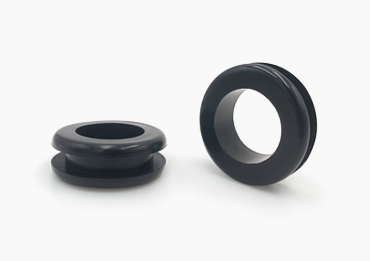
Two open-center Type D rubber grommets with panel mounting grooves
Catalog profile reference. Appearance alone does not identify a compound, hardness or certified material grade.

Product catalog & online ordering

Choose a Product Series to Order

Open a product series, match the drawing and part dimensions, then select the available material and color. Review the price and minimum order, add the part to your cart, and adjust the quantity before checkout. Select your required material on the product page; confirm the compound for your service conditions.

  1. 1. Match the sizeCheck the profile and complete dimensions.
  2. 2. Configure your orderSelect material and color; review price and MOQ.
  3. 3. Add to cartAdjust quantities, review your items and continue to checkout.

Translate the material requirement into an identifiable order

The selected geometry and material belong to the same ordered item. Keep both visible in the purchase specification.

Family name versus compound specification

NR, NBR, CR, EPDM, silicone, FKM and SBR are material names used in the product options. A family name is a starting point, not a complete compound specification. If your drawing calls for a particular grade or customer specification, provide its identifier and applicable revision.

Hardness and color references

State the hardness scale and permitted variation when these are controlled by your drawing. Identify the color requirement separately. A black or white appearance does not establish hardness, chemical resistance or compliance with a specified test.

Part number and units

Record the catalog part number together with its dimensions and units. Then check the material and color choices for that exact item. Do not infer that an option visible for another part is available in the same size or at the same minimum quantity.

Resolve service conditions before treating a material as approved

An orderable material option does not by itself establish suitability for every installation. Use the original material guide for detailed screening and bring unresolved conditions into the inquiry.

Describe the actual contact

Name the fluid or mixture, its concentration or formulation when known, and whether contact is occasional or continuous. Include cleaning agents and maintenance exposure as well as the normal operating medium. A broad label such as oil or solvent may leave important conditions undefined.

Separate operating conditions

List continuous temperature and short peak exposure separately, including duration. Add outdoor exposure, compression or movement requirements that matter to the installation. Do not combine several unrelated favorable ratings into an assumed approval for the complete assembly.

Specify the evidence you need

If procurement requires material documentation or a particular acceptance test, name it in the inquiry and confirm its availability and scope. The name of a rubber family does not prove that an individual compound has that documentation or meets the requirement.

Check the configured line item before checkout

Use the product page for commercial options and the cart for the order quantity. Review the selection again when you change a material.

Review price and minimum order

Select an available material and color on the product page and read the resulting unit price and MOQ. These values can differ between configurations of the same geometry. Add the intended configuration to the cart, then adjust the quantity within the applicable ordering rules.

Keep different materials as distinct items

When an assembly uses the same shape in different materials, identify each configuration separately in your purchasing records. Include the intended material in your internal part reference or line description so a repeated geometric part number does not conceal the difference.

Raise substitutions before placing the order

If the specified compound is absent from the available options, request a review rather than selecting another family as a placeholder. Provide the original requirement and the reason for considering a change. Confirm the agreed configuration before ordering.

Order preparation

Questions About Material Configuration

Clarify the specified material before selecting an order configuration.

Does selecting silicone confirm a food-contact or medical grade?

No. The product option identifies a material family. Supply the required grade, intended use and supporting documentation requirements so the actual compound can be reviewed.

Can the material change while the catalog part number stays the same?

A profile reference identifies geometry, while the order configuration also includes material and color. Check the complete line item in the cart and keep the selected configuration with your purchase record.

What should I do when my drawing specifies a hardness that is not shown?

Include the drawing requirement, scale and tolerance in an inquiry before ordering. Ask whether the selected part can be supplied to that specification; do not assume the standard option matches it.

Where can I compare rubber families against a fluid?

Open the full material guide for the selector and compatibility information. Treat its results as screening guidance, then confirm the compound and required evidence for the actual service conditions.

Need a material requirement reviewed?

Identify the product or drawing and the compound requirement that needs confirmation. Include the conditions and documentation relevant to your purchase.

Ask About a Material Specification

Send an Inquiry

Use the form below or email your drawings and requirements directly to [email protected].

One file, up to 20 MB. For multiple files, use ZIP or RAR.

Find Your Grommet Size

Choose a profile and enter your dimensions to compare catalog sizes.

Size Finder

Size Finder requires JavaScript. Browse all product types and sizes, or email [email protected] for help with your requirements.